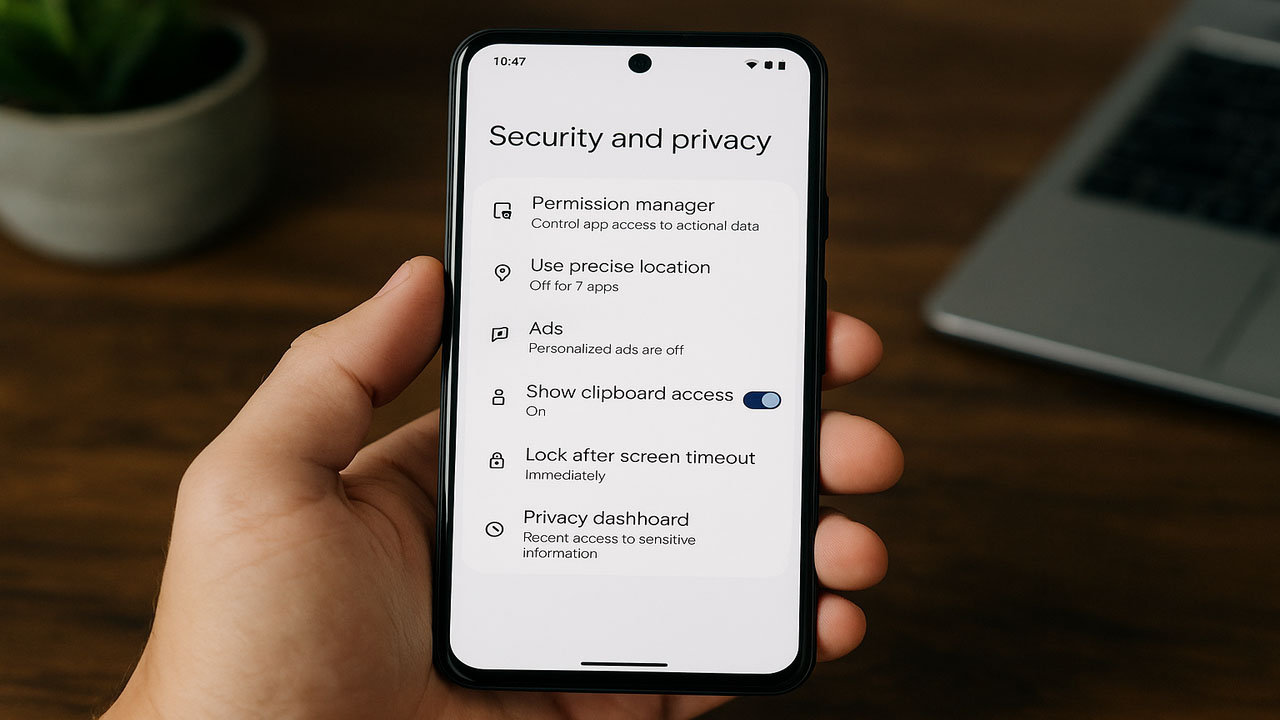
Latest Android Phone Privacy Settings to Maintain Personal Data Security
Tech by Android – Latest Android Phone Privacy Settings to Maintain Personal Data Security
Smartphones are now extensions of ourselves, storing sensitive data such as photos, messages, and personal accounts. Because of this, reviewing your Android Phone Privacy Settings regularly is essential to prevent unwanted data breaches. Neglecting privacy settings can expose your personal life to risks without you realizing it. According to Tech by Android, Android users have access to several built-in tools to protect their digital footprints.
Here are six essential settings every Android user should review regularly to maintain data safety:
Many apps request permissions that may not always be necessary. Location, microphone, and camera access are the most commonly requested. Sometimes, users grant these permissions without questioning the purpose behind them.
To manage this, go to:
Settings > Security and privacy > Privacy controls > Permission manager
Here, you can check which apps have access to which features. If an app like Chrome doesn’t need your location, simply revoke that access. Tech by Android emphasizes how removing unnecessary permissions significantly reduces privacy threats.
“Read more : Xiaomi, Oppo and Vivo Innovation Want to Create Replacement Technology for Android?“
Not all apps need to know your exact location. Services like ride-hailing apps or maps might require it, but others don’t. Allowing precise location can reveal patterns about your daily activities.
To adjust this, go to:
Settings > Security and privacy > Privacy controls > Permission manager > Location
Select each app and disable the Use precise location option. This way, the app only knows your approximate area like a city, not your exact coordinates.
Personalized ads are based on your app usage and browsing behavior. Although they seem useful, they also involve deep tracking of your activity. If you value privacy over targeted content, this setting is worth changing.
Follow these steps:
Settings > Security and privacy > Privacy controls > Ads > Ads privacy
Turn off Ad topics, App suggested ads, and Ad measurement. Also, tap Delete advertising ID to stop future ad targeting. Resetting your advertising ID can also prevent continued tracking.
Your clipboard stores anything you copy, like passwords or banking info. Some apps try to read clipboard content without asking. Android now offers a feature to alert users when an app accesses it.
To enable this, go to:
Settings > Security and privacy > Privacy controls > Show clipboard access
If you see unexpected notifications, uninstall suspicious apps. Protecting clipboard access is vital for maintaining personal security.
Android usually waits five seconds before locking the screen after it turns off. During this time, someone could access your phone if they’re quick enough. Reducing this delay strengthens physical device security.
To change the setting:
Settings > Security and privacy > Device unlock > Screen lock (gear icon)
Tap Lock after screen timeout, then choose Immediately. Also, activate Power button instantly locks for extra safety.
“Read more : Regulations and Compliance in Best Practices for Radiation Monitoring“
Privacy Dashboard is an Android feature that shows recent access to your camera, microphone, or location. It helps detect suspicious activity from background apps.
To open it:
Settings > Security and privacy > Privacy dashboard
Check the access logs under Camera, Microphone, and Location. If an app used the microphone while you weren’t using it, investigate further. Techbyandroid.com recommends removing such apps if they show unexpected behavior.
Keeping your Android device secure goes beyond using passwords and fingerprints. Monitoring your Android Phone Privacy Settings ensures your digital life stays protected. The more you understand how apps interact with your phone, the more control you gain over your data.
Regular privacy checks help detect and prevent misuse before it becomes a threat. Whenever you install a new app, review its permissions immediately. If something feels unnecessary or invasive, disable it or uninstall the app entirely.
For the latest updates on Android privacy tools, refer to resources like techbyandroid.com. They regularly publish trustworthy guides and reviews on Android’s evolving security features.
Tech by Android - pembaca kini dapat menemukan lebih dari 50 artikel inspiratif yang dirangkum dalam satu koleksi, menurut survei…
Tech by Android - pasar aplikasi Android kini dipenuhi 150 juta unduhan baru pada kuartal pertama 2024, menandakan lonjakan 12%…
Tech by Android - pembaruan Android 13.2 yang dirilis bulan April 2024 membawa tiga fitur utama yang langsung meningkatkan performa…
Tech by Android - Pada minggu ini, Android 14.2 mulai menyebar ke perangkat flagship, memperkenalkan mode privasi baru dan peningkatan…
Tech by Android - Smartphone terbaru meluncur dengan chipset Snapdragon 8 Gen 3, menambah 20% performa dibanding generasi sebelumnya, menurut…
Tech by Android - Android versi 14 resmi diluncurkan pada Mei 2024, menghadirkan mode privasi baru yang mengurangi pelacakan aplikasi…